 is located in the upper-left corner of the following 2007 Microsoft
Office system programs: Word, Excel, PowerPoint, Access, and Outlook (in
the composing and reading windows).
is located in the upper-left corner of the following 2007 Microsoft
Office system programs: Word, Excel, PowerPoint, Access, and Outlook (in
the composing and reading windows).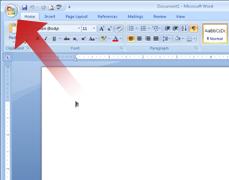
Top of Page
What do I see when I click the Office Button?
When you click the Office Button, you see the same basic commands available on the File menu in earlier releases of Microsoft Office to open, save, and print your file.
However, in the 2007 Office release, more commands are now available, such as Finish and Publish. For example, in Word, Excel, and PowerPoint by pointing to Finish, and then clicking Inspect Document, you can check a file for hidden metadata or personal information.
Top of Page
Where is the Options command?
After you click the Office Button, you can also see the new location where you can set your preferences. The Options command that was on the Tools menu has been moved to be under the Office Button . The new location for the Options command is in the lower-right corner under Word Options, Excel Options, PowerPoint Options, or Access Options. The following shows the location in Microsoft Office Excel 2007.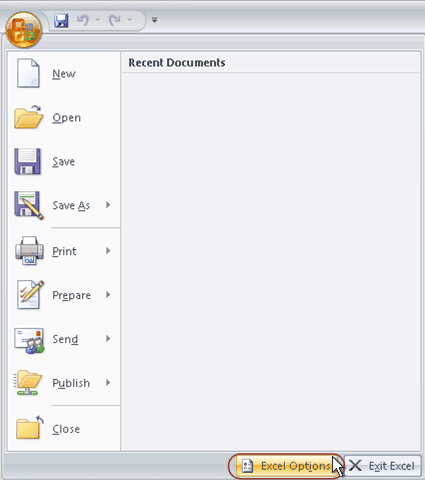 .
.

Tidak ada komentar:
Posting Komentar